Manage Notifications
In animundo, you can find all your notifications in one central place. You can view new and previously read notifications and decide which topics you would like to receive notifications about.
View notifications
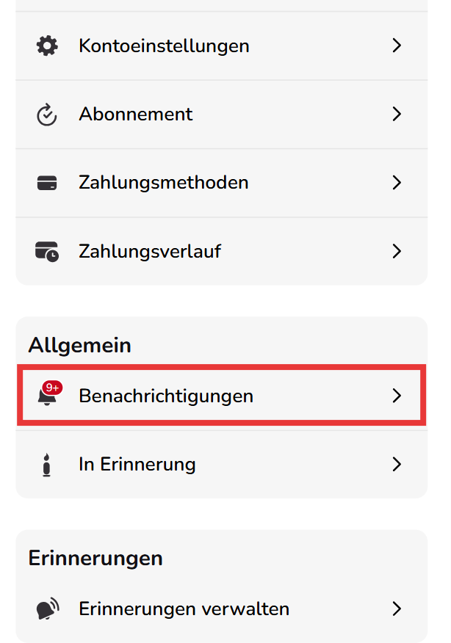
- Tap “Profile” in the menu bar at the bottom.
- Under “General”, select “Notifications”.
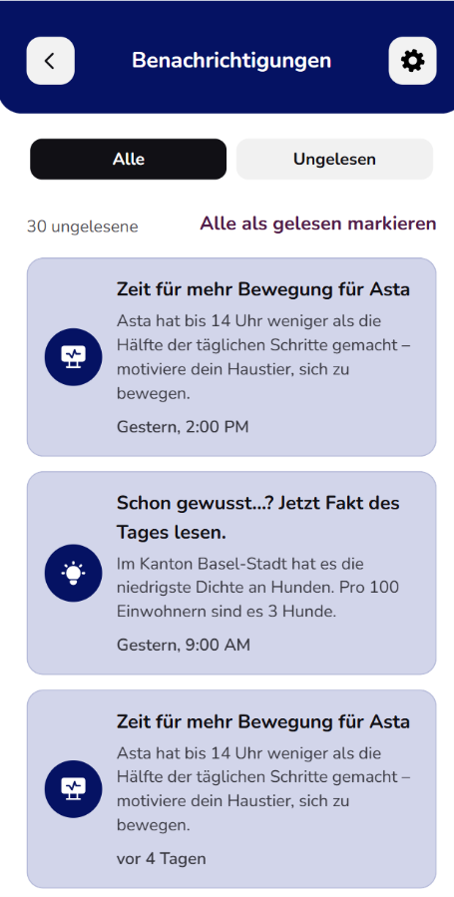
- Under “All”, you can find all notifications you have received.
- Select “Unread” if you only want to see notifications that you have not yet opened.
- Tap “Mark all as read” to mark all unread notifications as read at once.
Manage notifications
You can decide which topics you would like to receive notifications about:
- Open the “Notifications” page.
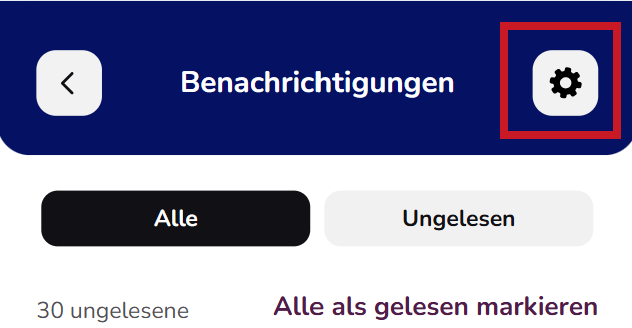
- Tap the gear icon in the top-right corner.
- In the notification settings, you can turn individual categories on or off.
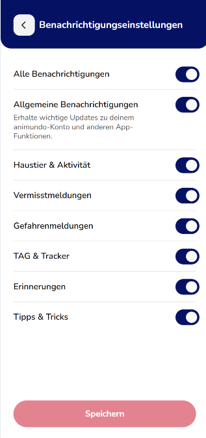
- Then tap “Save” to apply your settings.
The following categories are available:
- General notifications: Important information about your animundo account and app features.
- Pet & Activity: Information and updates about your pet and its activity.
- Missing Pet Alerts: Notifications about missing pets.
- Danger Alerts: Notifications about reported dangers.
- TAG & Tracker: Notifications related to your animundo TAG and Tracker.
- Reminders: Notifications about your saved reminders and appointments.
- Tips & Tricks: Helpful tips and information about your pet and animundo.
With “All notifications”, you can turn all notification categories on or off at once.