Add and Manage Documents in Records
With “Records”, you can store important files and documents related to your pet in one central place in animundo. This allows you to keep official documents, insurance paperwork, invoices and other important files easily accessible at any time.
Open Records
- Open the desired pet profile.
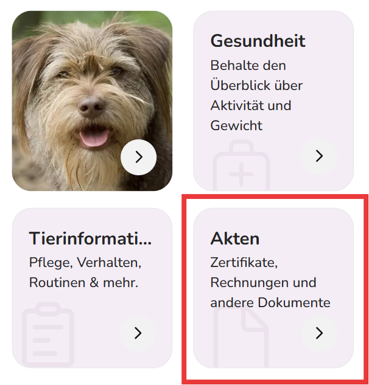
- Tap “Records”.
- Here, you will find all the documents you have already uploaded for this pet.
Upload a New Document
To add a new file to your pet’s records:
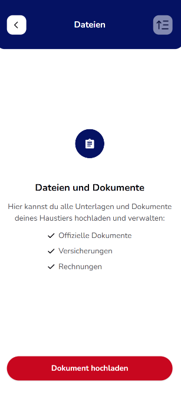
- Tap “Upload Document”. If documents have already been uploaded, you can also use the plus icon (+).
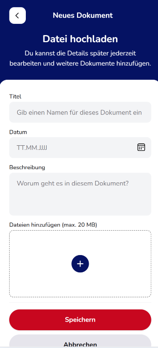
- Enter a suitable title for the document.
- Select the date of the document.
- If needed, add a description so you can easily identify the document later.
- In the “Add Files” section, tap the plus icon (+) and select the files you want to upload.
- Then tap “Save”.
You can also add multiple files at once to a single document entry.
Which Files Can I Upload?
The following file formats are supported:
Images: JPG, JPEG, PNG, GIF and WEBP
Documents: PDF and DOCX
Spreadsheets: XLSX
Presentations: PPTX
The maximum file size is 20 MB per file.
Manage Uploaded Records
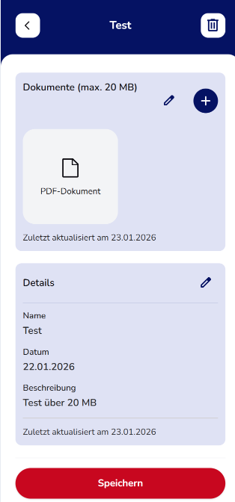
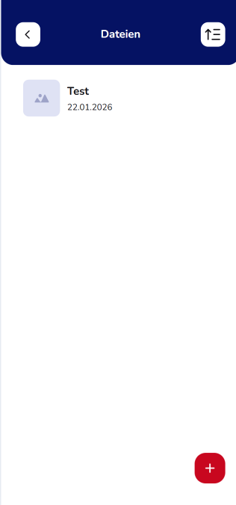
After saving, the document will appear in the overview under “Files”. Tap an entry to view its saved information and attached files.
This allows you to assign insurance documents, veterinary records, certificates, invoices and other important paperwork directly to the relevant pet.
Tip: Use clear, descriptive titles and include the document date. This will help you quickly find important files whenever you need them.