Calendar
With the Calendar, you can keep track of important appointments and reminders related to your pets. For example, you can add and manage veterinary appointments, vaccinations, medications, deworming treatments, grooming sessions and training activities.
Open the Calendar
You can access the calendar directly from the Dashboard:
- On the Dashboard, tap the red “+” to open the action menu.
- Select “Calendar”.
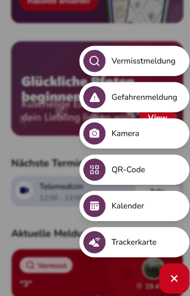
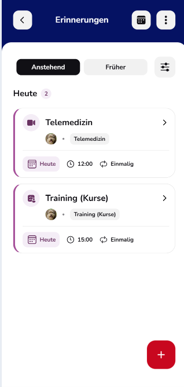
- Your reminders and appointments will open.
If you already have upcoming appointments, an additional “Upcoming Appointments” section will appear on the Dashboard. Here, you can see your next scheduled appointments, including the time and the associated pet. If there are no upcoming appointments, this section will not be displayed.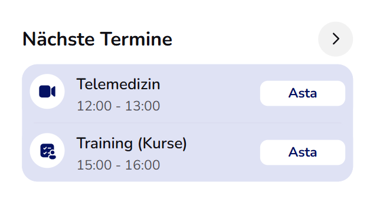
Switch Between List and Calendar View
In the top-right corner, you can choose how your appointments are displayed:
- List View: Displays your reminders in a clear, organised list. You can switch between upcoming and past reminders using “Upcoming” and “Past”.
- Calendar View: Displays your appointments by date in a monthly calendar. Select a day to view the corresponding appointments below.
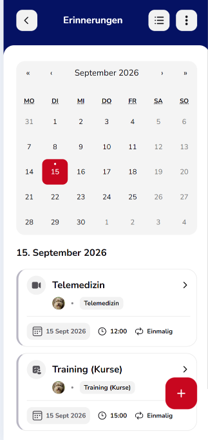
Add a New Reminder
Tap the red “+” in the bottom-right corner to create a new reminder.
When creating a reminder, you can enter the relevant appointment details and assign it to your pet and an appropriate category.
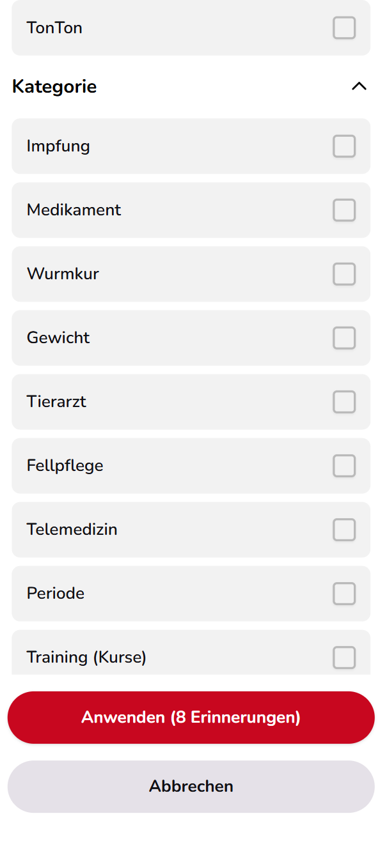
Available categories include Vaccination, Medication, Deworming, Weight, Veterinarian, Grooming, Telemedicine, Period and Training (Courses).
Filter Reminders
Use the filter icon to choose which reminders you want to display. For example, you can filter by a specific pet or by category.
This helps you quickly find the relevant entries, even if you have many saved appointments.
Manage Appointments
Tap an appointment to view its details. This allows you to review and manage your saved reminders.
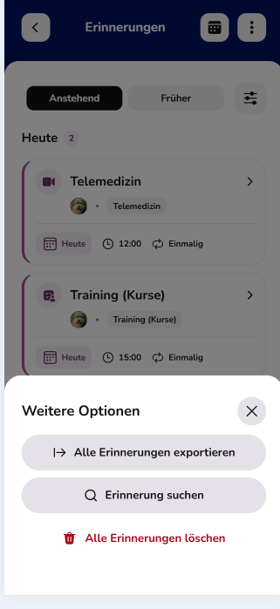
The three-dot menu in the top-right corner also provides additional options:
- Export All Reminders
- Search Reminders
- Delete All Reminders
Good to Know
Telemedicine appointments booked through animundo are also displayed in the calendar. This allows you to keep all your personal reminders and important pet-related appointments organised in one central place.