TAG
With the animundo TAG, your pet gets a personal QR code. If someone finds your pet, they can scan the QR code on the TAG using their smartphone and contact you through animundo. This way, the TAG can help reunite you with your pet more quickly.
Access the TAG
You can access the TAG section directly through your pet’s profile:
- Open your pet’s Pet Profile.
- Scroll down to the “animundo TAG” section.
- Tap “Connect”.
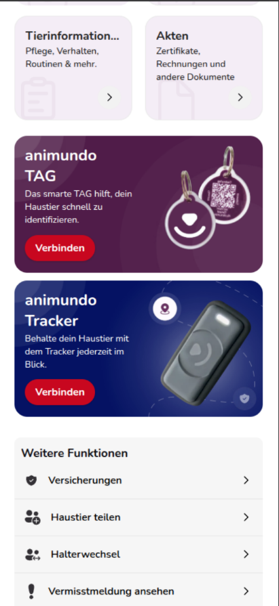
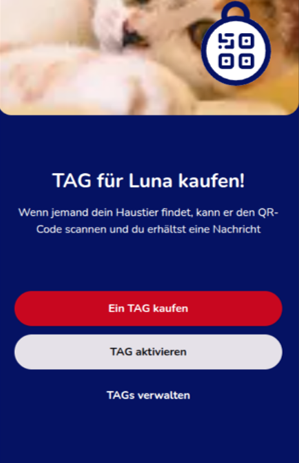
You will then have several options:
- Buy a TAG
- Activate TAG
- Manage TAGs
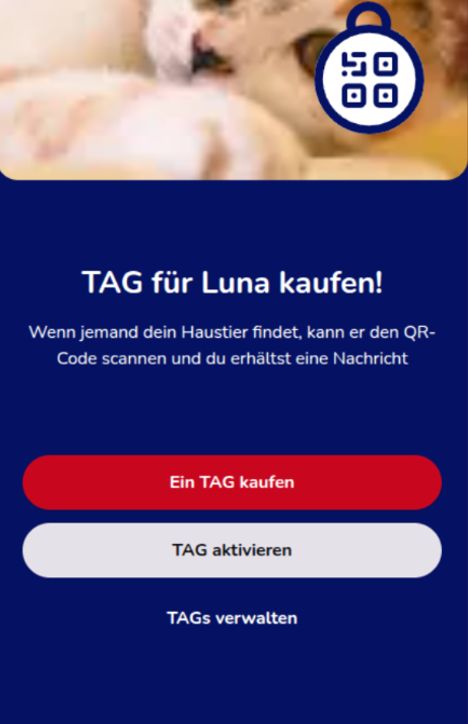
Buy a New TAG
If you don’t have an animundo TAG yet, you can order one directly through the app.
- Open the “animundo TAG” section in your pet’s profile.
- Tap “Buy a TAG”.
- Follow the remaining steps to order a TAG for your pet.
Once you receive your TAG, you can activate it through the app and connect it to your pet.
Activate a TAG
If you already have an animundo TAG, you can activate it using its QR code.
- Open the “animundo TAG” section in your pet’s profile.
- Tap “Activate TAG”.
- Scan the QR code on your animundo TAG using your smartphone.
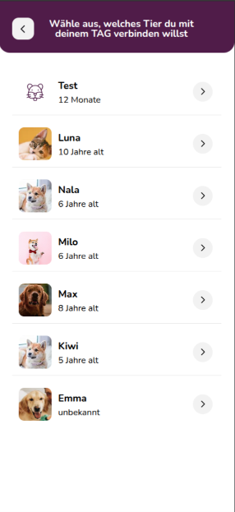
- Select the pet you want to connect the TAG to.
- Once activation is successful, you will see the confirmation “TAG Added”.
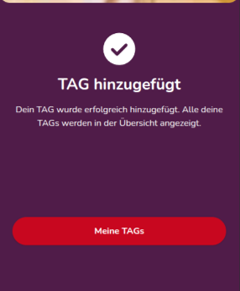
The TAG is now connected to the selected pet.
Note: Make sure you scan the QR code of an animundo TAG. If a different or invalid QR code is detected, the message “Incorrect QR Code” will appear.
Manage TAGs
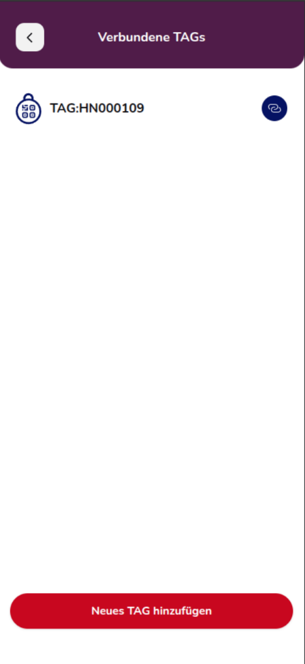
Under “Manage TAGs”, you can see an overview of the TAGs you have already connected.
Here you can view information such as the TAG number. You can use the connection icon to manage which pet a TAG is assigned to.
If you want to add another TAG, tap “Add New TAG” and follow the activation process.
What Happens When Someone Scans the TAG?
Each animundo TAG has a personal QR code. If someone finds your pet, they can scan this QR code using a smartphone.
This allows them to access information relevant to the found pet and contact you through animundo. The person who finds your pet therefore does not need to know your personal contact details in advance to inform you that your pet has been found.
Assign a TAG to Another Pet
When you activate a TAG, animundo displays the pets registered in your account. Select the pet you want to assign the TAG to.
Make sure you connect the correct TAG to the correct pet so that the appropriate pet information is displayed when the QR code is scanned.
Use Multiple TAGs
Under “Manage TAGs”, you can view your connected TAGs and add more. This allows you to manage the appropriate TAGs even if you have multiple pets.
Tip: Attach the activated animundo TAG securely and visibly to your pet’s collar or harness. This makes it easy for someone to recognise and scan the QR code if your pet is found.
Frequently Asked Questions
What is the animundo TAG?
The TAG is a small pendant with a QR code that you attach to your pet’s collar. You can easily link it to your pet’s profile and choose which of your contact details are visible. If your pet is found, the person who finds it can scan the code and notify you directly.
Which pets can use the TAG?
The TAG is suitable for all pets.
Are there any monthly fees for using the TAG?
No. TAGs can also be used with the free version of animundo. You only pay a one-time purchase price for the TAG.
How long does a TAG last?
The animundo TAG works without a battery, so it doesn’t require electricity, and its QR code can always be scanned. This means you can use it for years.
How do I activate a TAG for my pet?
In the app, open the camera function and select “Scan QR Code”. Then scan the QR code on the TAG, choose which pet the TAG should be assigned to, and the TAG will be linked to your pet.
Does the TAG have additional features?
Yes. The animundo TAG has an integrated RFID chip. This means you can use the TAG not only as a digital pet ID tag but also with smart devices such as automatic feeders or pet doors, provided the device supports RFID technology.
What is an RFID chip?
An RFID chip is a small wireless chip that works like a key. Similar technology is also used in implanted pet microchips and access cards.
Many smart pet devices, such as automatic feeders or cat flaps, can be programmed to unlock only when they detect the animundo TAG.
Does the person who finds my pet need the animundo app?
No. The person only needs an internet connection to open the QR code link and contact you.
What happens when my pet is found?
The person who finds your pet scans the QR code and immediately sees whether your pet has been reported missing.
If your pet has been reported missing, they are directed to the contact feature. If your pet has not been reported missing, they must first confirm that it is an emergency before they can contact you through a contact form.
They do not need the animundo app or their own account.
What information can someone see when they scan the QR code?
The person who finds your pet can only see the contact options you have chosen to share, such as your phone number or email address. Your remaining personal information stays protected.
What happens if my TAG is lost or stolen?
You can disconnect the TAG in the app at any time. Once disconnected, the QR code is no longer linked to your pet and becomes useless to third parties.
Can I disconnect a TAG from one pet and reuse it later?
Yes. You can disconnect a TAG at any time and reactivate it later for the same pet or another pet.
Can I equip multiple pets with TAGs?
Yes. You can manage multiple pets in the app and activate several TAGs for each pet.
How durable is the TAG?
The TAG is splash-resistant and designed for the everyday activities of cats and dogs. It can withstand normal wear and tear, including rain, playing and minor scratches.
How big is a TAG?
The animundo TAG has a diameter of 2.5 cm (excluding the ring), making it suitable for dogs and cats of all sizes.
Is the TAG a replacement for a microchip?
The TAG can also be used with RFID-controlled automatic feeders or pet doors. However, an implanted microchip cannot be lost and therefore helps ensure that your pet can always be identified in an emergency.
We recommend using the TAG as a complement to the implanted microchip, especially because it makes it much easier for someone to contact you directly and immediately if your pet is found.
How is the TAG different from a traditional pet ID tag?
Unlike a traditional tag displaying a phone number, the animundo TAG offers greater flexibility.
You can update your contact details in the app at any time without buying a new tag. In addition, your contact details are not publicly visible.
Does the TAG work abroad?
Yes. The QR code can be scanned anywhere in the world. Whether the person who finds your pet can contact you depends on the contact information you have chosen to share.
What happens if the QR code gets scratched or becomes unreadable?
The QR code is designed to be durable. However, if it becomes damaged, you can disconnect the TAG in the app and purchase and activate a new one.
Do I need an active internet connection for the TAG to work?
No. The person who finds your pet only needs an internet connection to open the QR code link and contact you.
Your pet itself does not need GPS or a mobile connection.
However, you will only receive the notification on your smartphone if you have an active internet connection.